How the Internet Reaches You.
A simple guide to modems, routers, switches, and how network traffic really flows
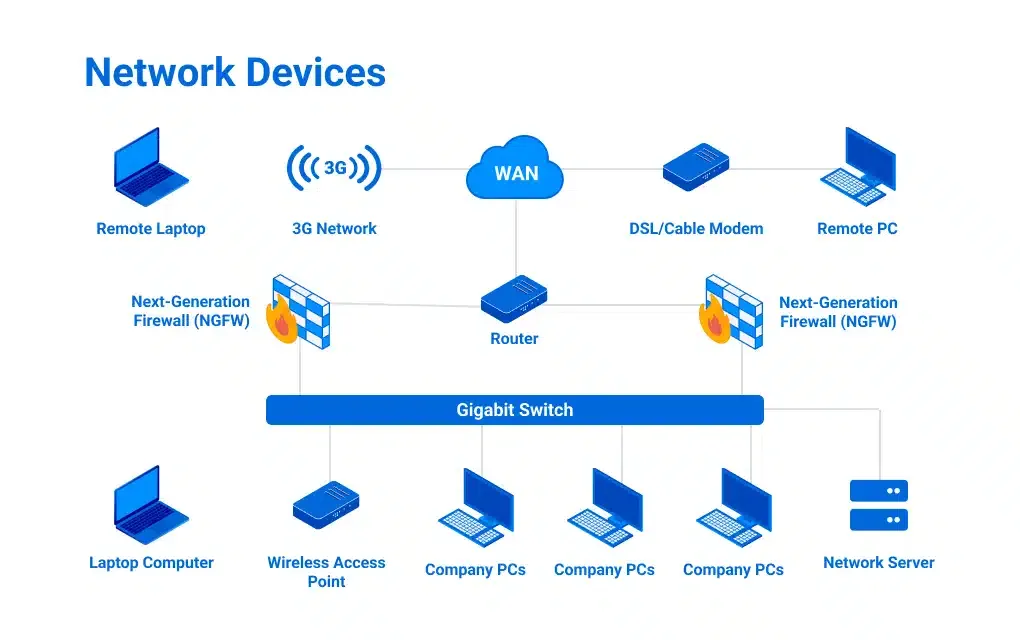
How the Internet Reaches You: Modems, Routers, Switches, and More
Before we talk about servers, APIs, or cloud systems, it helps to understand the physical devices that move data from the internet to your application. Every request your backend handles has already passed through multiple networking devices long before it reaches your code.
Let’s start from the outside and work our way in.
The Big Picture: From the Internet to Your Network
A typical home or office setup looks like this:

Along the way, traffic may also pass through:
Firewalls (security gates)
Load balancers (traffic distributors)
Each device has one primary responsibility. Understanding those responsibilities is the key.
What Is a Modem? (Connecting You to the Internet)
Problem it solves:
Your network speaks digital. The internet connection from your ISP often does not.
A modem connects your local network to your Internet Service Provider (ISP).
It converts digital data from your network into a form that can travel over phone lines, cable, or fiber
It converts incoming signals back into digital data
That’s where the name comes from:
MOdulator
DEModulator
Analogy:
A modem is like a translator between two people who speak completely different languages.
Key takeaway:
Without a modem, your network cannot talk to the internet at all.

What Is a Router?
Problem it solves:
Once data enters your network, where should it go?
A router connects different networks and decides how traffic moves between them.
It:
Connects your local network to the internet
Routes traffic based on IP addresses
Separates internal devices from the outside world
Analogy:
A router is a traffic police officer directing cars to the correct roads.
For software engineers:
Every incoming API request first passes through a router before it ever reaches your backend.

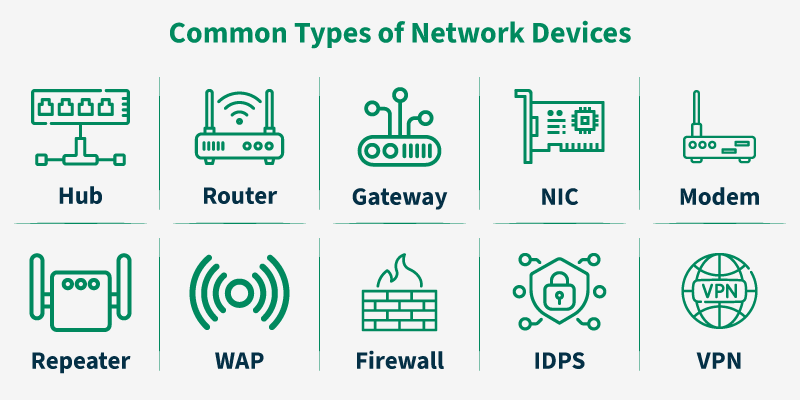
Switch vs Hub: How Local Networks Actually Work
Hub (The Old Way)
Problem:
How do devices communicate inside a local network?
A hub sends incoming data to every connected device, whether it’s needed or not.
No intelligence
No filtering
Massive inefficiency
Analogy:
Someone shouting a message in a crowded room and hoping the right person hears it.
This is why hubs are obsolete.

Switch (The Modern Way)
A switch connects devices within a local network and sends data only to the intended recipient.
It:
Learns device MAC addresses
Forwards data precisely
Reduces noise and collisions
Analogy:
A receptionist who knows exactly which desk to send each message to.
Why this matters:
Switches make local networks fast, scalable, and predictable.

What Is a Firewall?

Problem it solves:
Not all traffic should be allowed.
A firewall inspects traffic and decides what is allowed in or out.
It can filter based on:
IP addresses
Ports
Protocols
Application-level rules
Analogy:
A security gate checking IDs before letting people in or out.
For developers:
Many production bugs are actually firewall misconfigurations, not code issues.

What Is a Load Balancer?
Problem it solves:
One server cannot handle all traffic forever.
A load balancer sits in front of multiple servers and distributes requests.
It:
Improves performance
Prevents overload
Enables horizontal scaling
Adds fault tolerance
Analogy:
A toll booth with multiple lanes instead of one.
In real systems:
Almost every large-scale backend sits behind a load balancer.
How All These Devices Work Together
A realistic production flow looks like this:

Each device solves a specific problem:
Modem: connectivity
Router: direction
Switch: efficiency
Firewall: security
Load balancer: scalability
No overlap. No redundancy.
Why This Matters for Software Engineers
Even if you never touch hardware:
Your APIs rely on routers and switches
Your deployments rely on load balancers
Your outages often involve DNS, firewalls, or routing
Understanding these devices helps you:
Debug production issues faster
Design scalable systems
Communicate better with infra and SRE teams
Conclusion
Every web request your application handles has already traveled through modems, routers, switches, firewalls, and load balancers before it reaches your code. These devices aren’t just networking concepts they’re the physical foundation your backend depends on. Once you understand what each one is responsible for, production systems become easier to reason about, failures make more sense, and scaling stops feeling like guesswork. Good software runs on good infrastructure, and understanding the basics of that infrastructure is part of being a strong engineer.


