Git - Behind The Scene
How Git Stores, Tracks, and Protects Your Code- The quiet system working behind every commit.
Here we focus on what Git is actually doing behind the scenes in simple, practical terms.
Instead of listing commands to memorise, we’ll look at how Git stores, tracks, and connects changes internally.
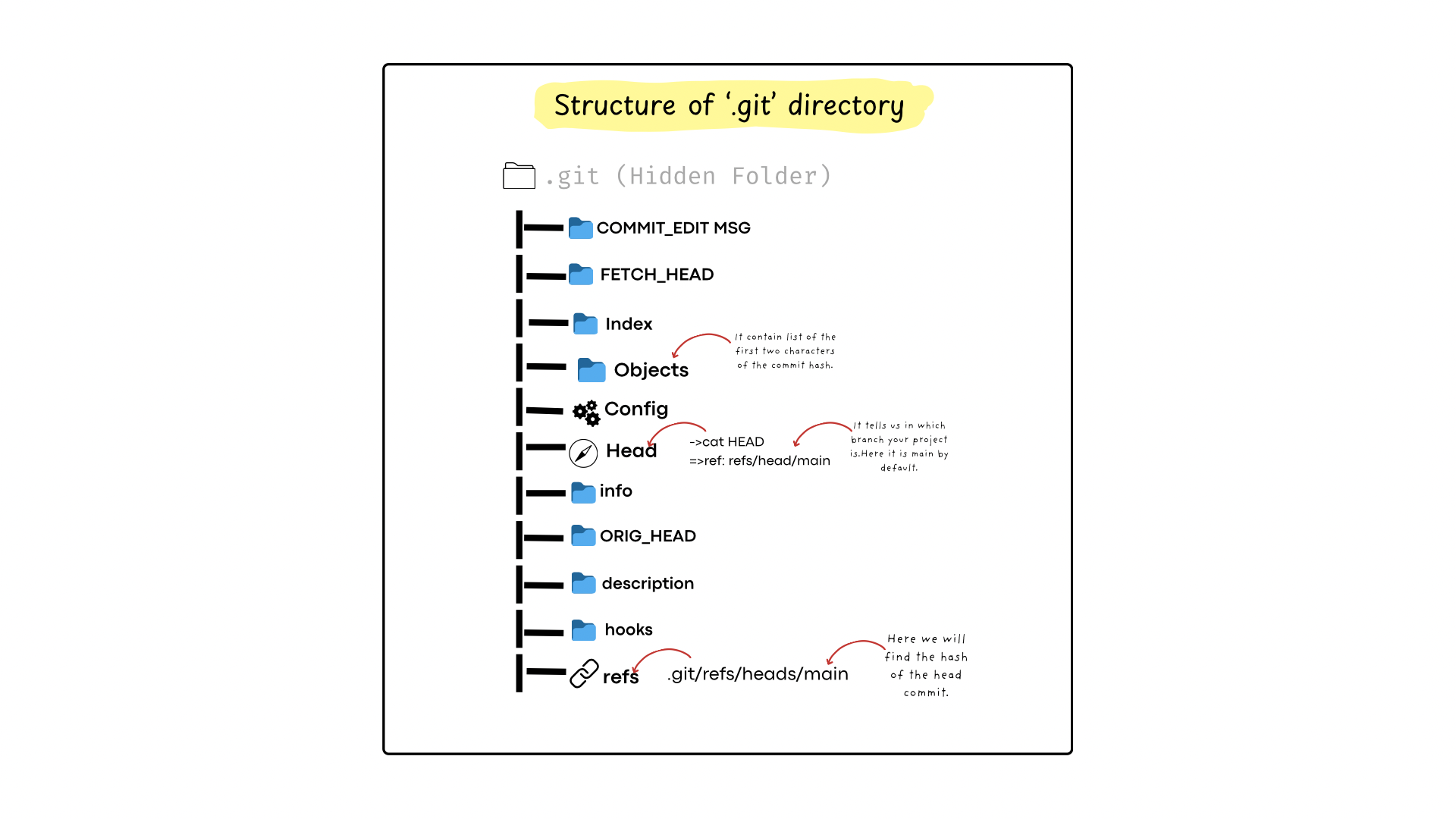
The .git Folder: Git’s Entire Brain
When you run git init, something quiet happens.
Git creates a hidden folder called .git.
This folder’s only job is to:
Store versions of your files
Remember relationships between them
Keep history safe and verifiable
You don’t edit .git directly. You talk to it using Git commands.
Think of .git like a locked filing cabinet:
You never open it yourself
You just ask Git to fetch or store things
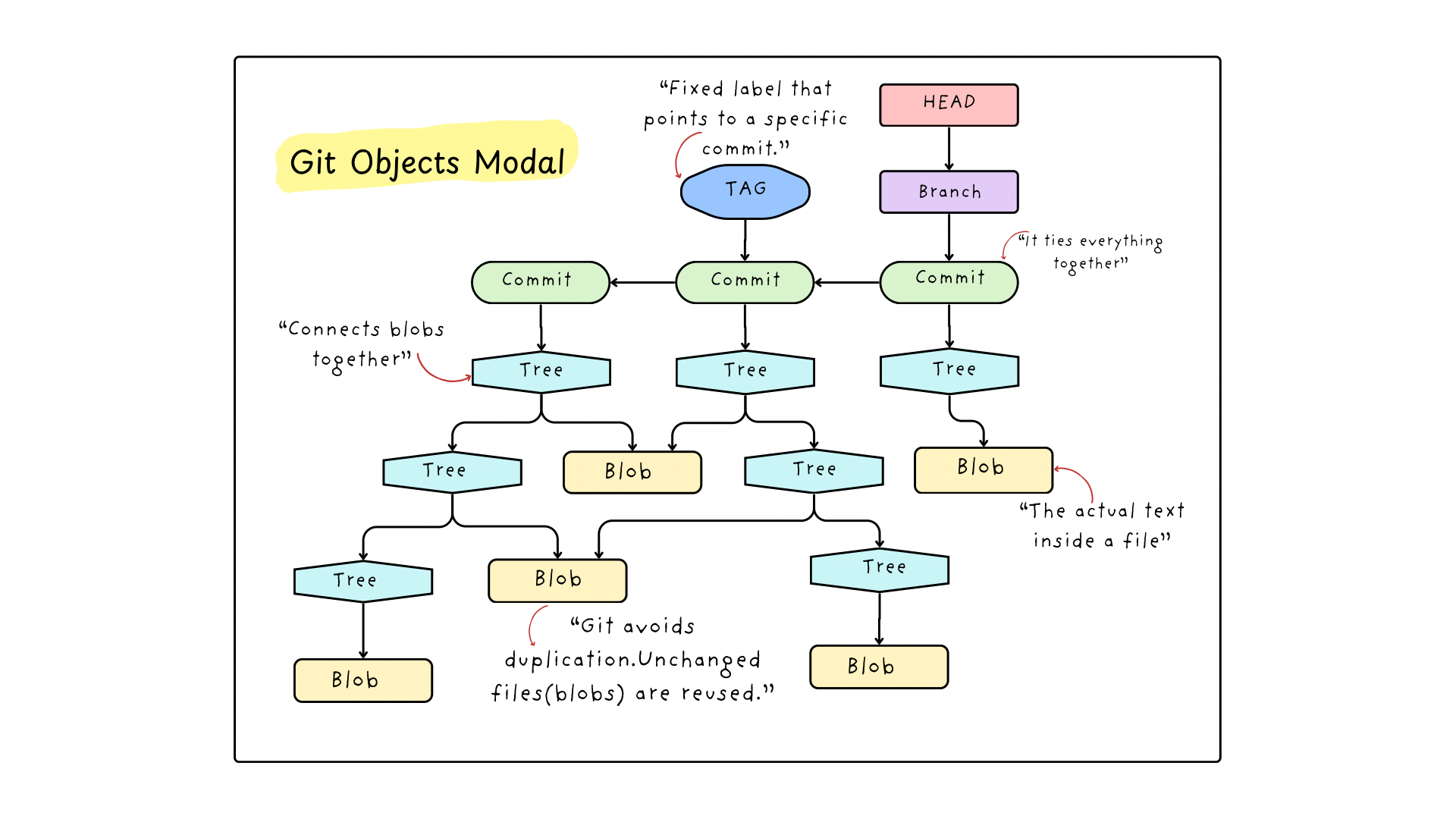
Git Objects Model
Internally, Git stores everything as objects.
There are only three you need to understand.
1. Blob — “The File Content”
A blob is just raw file content.
Not:
File name
File path
Just the actual text inside the file.
If you change one line, Git creates a new blob.
Think of a blob as:
“What’s written inside the file.”
2. Tree — “The Folder Structure”
A tree connects blobs together.
It says:
Which files exist
What they’re called
How folders are organized
A tree doesn’t store file content. It stores pointers to blobs.
Think of a tree as:
“How files are arranged.”
3. Commit — “The Snapshot”
A commit ties everything together.
It points to:
One tree (project structure)
A parent commit (history)
Metadata (author, message, time)
A commit is Git saying:
“This is what the project looked like at this moment.”
How Git Tracks Changes
As we saw earlier, Git tracks content, not files.
This is why it detects changes by comparing content fingerprints, not filenames or timestamps.
When a file changes, Git:
Reads the full content of the file
Creates a unique fingerprint (hash) for that content
Stores it only if it hasn’t seen that content before
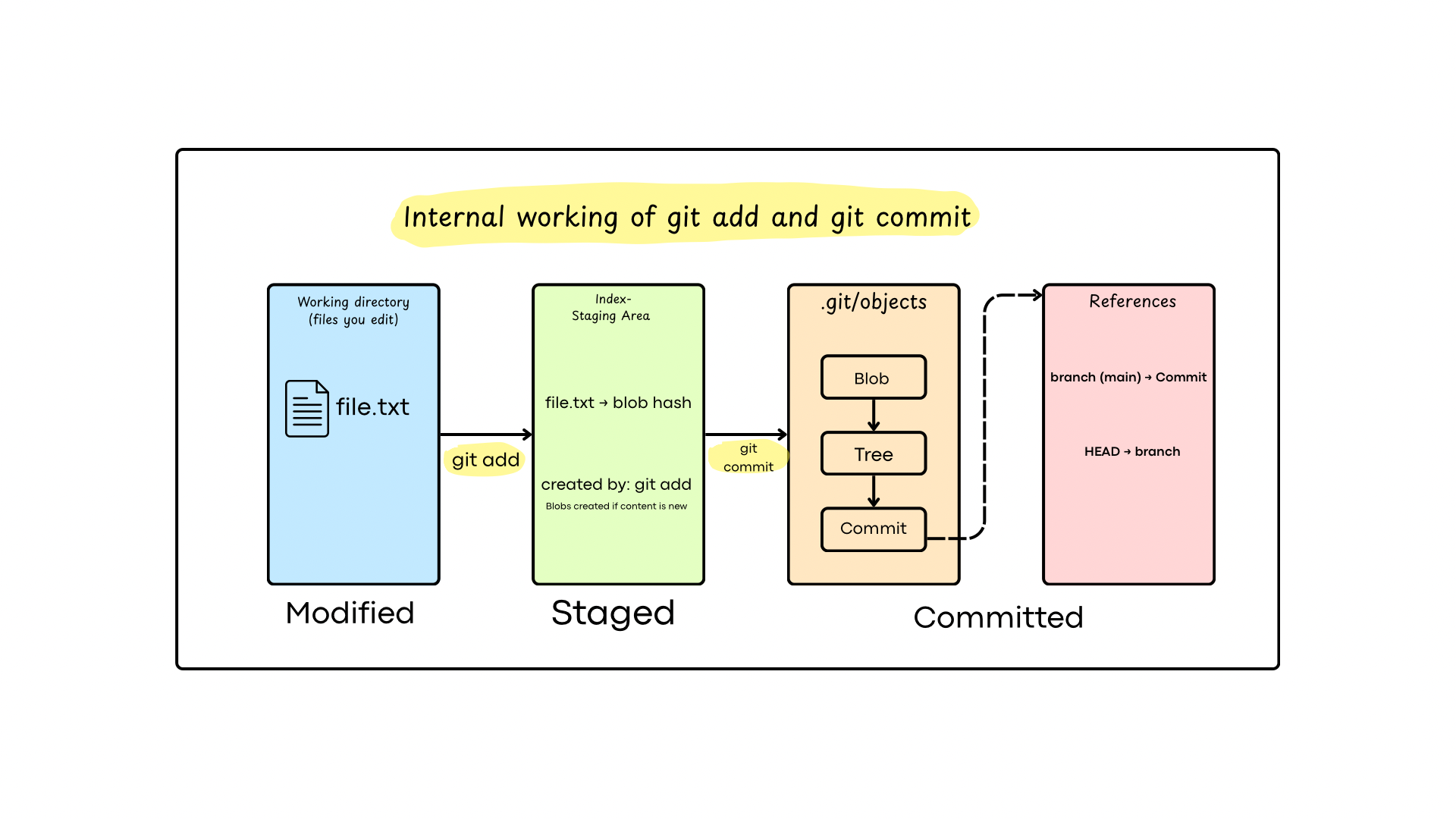
What Actually Happens During git add & git commit
When you run git add, Git:
Reads the file content
Creates blobs for changed files
Updates the staging area (index)
Nothing is permanent yet.
Git is just preparing a snapshot.
When you run git commit, Git:
Creates a tree from the staged files
Creates a commit object
Links it to the previous commit
Moves HEAD forward
Your code isn’t copied. It’s referenced.
That’s why commits are fast.
How Git Uses Hashes to Ensure Integrity
Git never assumes your code is correct.
It verifies it.
Git does this using hashes.
What Is a Hash
A hash is like a digital fingerprint of content.
Same content → same hash
Even a tiny change → completely different hash
Change one letter, one space, or one line — the fingerprint changes.
How Git Uses This Idea
Whenever Git stores something (a file, a folder structure, or a commit), it:
Takes the content
Generates a hash from it
Uses that hash as the object’s identity
Why This Guarantees Integrity
Because of hashes, Git can always answer these questions with certainty:
Has this file been changed?
Is this commit exactly the same as before?
Has anything been corrupted or tampered with?
Commits Are Self-Verifying
A commit hash depends on:
The content of files (blobs)
The folder structure (tree)
The parent commit
Metadata (author, time, message)
So if anything inside history is altered:
The commit hash changes
Every commit after it breaks
How You Notice Hash Changes in Daily Work
git statusThis tells you whether content has changed.
If Git says “modified” → the content hash is different
If nothing is modified → hashes are the same
git diffShows what changed.
git logEvery commit has a unique hash.
When you commit new changes, you’ll see a new hash appear.This confirms:
Old content → old hash
New snapshot → new hash
What a Git Hash Actually Points To
Git lets you inspect what a hash actually represents.
git cat-file -p <hash>
This command prints the content stored for that hash.
Blob → file content
Tree → folder structure
Commit → metadata and snapshot reference
The Only Git Mental Model You Actually Need
Don’t think of Git as commands.
Think of it as snapshots and pointers.
1. Git Stores Snapshots
When you save work in Git, it doesn’t record what you changed.
It records what your project looks like right now.
This happens when you run: git commit
A commit is a snapshot of your project at that moment.
2. Git Prepares Before Saving
Before Git creates a snapshot, it asks you what should be included.
That’s what this command does: git add
3. Git Moves Pointers, Not Files
Branches and HEAD are pointers, not copies of code.
When you switch branches: git checkout
Git simply moves your position to a different snapshot.
No history is rewritten.
4. Git Rarely Deletes History
Most commands just move pointers.
Example:git reset
This usually changes where you are, not what Git has stored.
Final Thought
Git is precise.
It records exactly what you tell it to record, based on clear rules and simple data structures.
Once you understand how Git stores and connects changes internally, its behaviour becomes predictable.


