Your browser is kind of dumb.
It doesn’t understand website names like google.com or youtube.com , it only understands numbers called IP addresses. So when you type a website name, the browser has no idea where that site actually lives. It’s like asking someone to call a friend by name when phones only work with phone numbers.In the early days of the internet, people could remember which IP address belonged to which computer. This was a terrible long-term plan. As more devices and humans joined the network, memorizing long strings of numbers became unrealistic. While you can still type an IP address into a browser, no one wants to live like that. Humans like names. Computers like numbers. DNS exists to keep the peace, acting as the phonebook of the internet and translating website names into the numeric addresses computers insist on using.
So what is DNS?
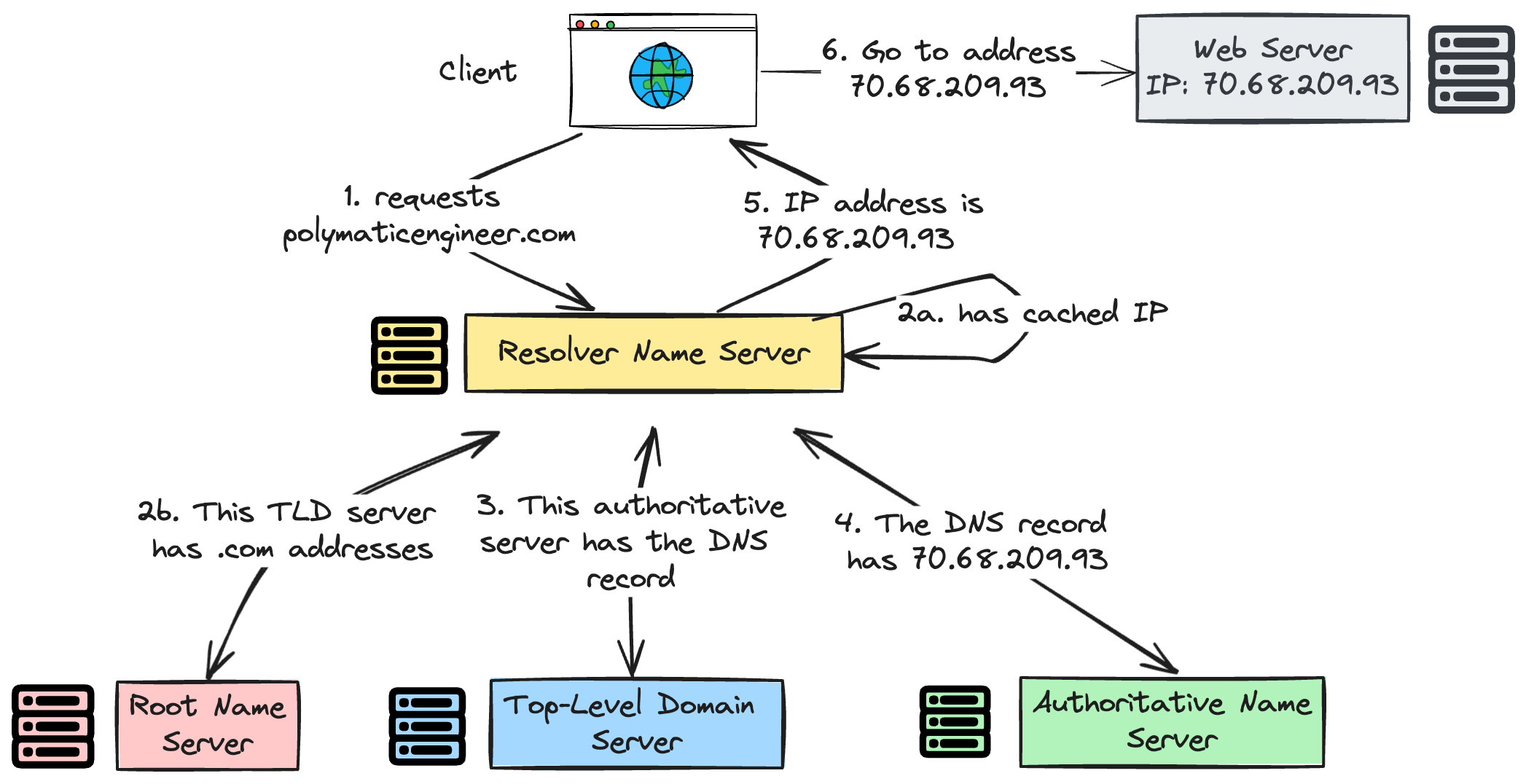
DNS is a lookup system. You type a website name, DNS finds its IP address, and your browser connects to it. Without DNS, websites wouldn’t load, emails wouldn’t work, and the internet wouldn’t function.
DNS as a Real-Life System
| Internet | Real Life |
| Domain name | Person’s name |
| IP address | Phone number |
| DNS server | Contacts app |
| DNS record | Contact entry |
What are DNS Records?
Asking DNS is like asking for a friend’s address:
Sometimes you get the exact house address
Sometimes you’re told who has the address
Sometimes you’re redirected because your friend moved
DNS records are simply the rules that decide which kind of answer you get.
When you ask DNS something like “What’s the IP address of google.com?”, one of two things happens:
The DNS server knows the answer and gives you the IP address
Or it doesn’t know, but knows who to ask next
That’s why DNS records exist.
Different DNS records answer different questions:
Some give final answers
Some point to the right authority
Some handle email or aliases
Some exist for security and verification
Types of Records

A Record - Where the Website Lives
Problem it solves:
Your browser needs a numeric address to reach a website.
What it does:
An A record connects a domain name to an IPv4 address. When you type a website name, this is usually the record that finally gives your browser the exact location of the server.
Real-life example:
A house name mapped to its street address so delivery drivers know where to go.

AAAA Record - The New Address Format
Problem it solves:
The internet is running out of old-style addresses.
What it does:
AAAA records do the same job as A records but use IPv6, which supports far more devices and servers. Modern systems prefer AAAA when available.
Real-life example:
The same house address written in a newer, more detailed GPS format.

CNAME Record - Multiple Names, One Place
Problem it solves:
Websites often need more than one name pointing to the same location.
What it does:
A CNAME record makes one domain name act as an alias for another. Instead of pointing directly to an IP, it points to a different domain name that already knows where to go.
Real-life example:
“Mom” and “Mother” both calling the same phone number.

MX Record - Where Emails Should Go
Problem it solves:
Email systems need to know which server receives mail for a domain.
What it does:
MX records tell email servers where to deliver messages sent to addresses like user@example.com. They often include backup servers in case the main one is unavailable.
Real-life example:
A company’s mailroom address, not the front door.

NS Record - Who’s in Charge of the Domain
Problem it solves:
The internet needs to know which DNS servers are the final authority for a domain.
What it does:
NS records point to the authoritative DNS servers that store all the records for a domain. Any serious DNS question eventually ends up here.
Real-life example:
Knowing which post office handles all mail for your neighborhood.

TXT Record - Proof, Rules, and Notes
Problem it solves:
Domains need a way to prove ownership and set rules.
What it does:
TXT records store text data used for verification, security, and trust, especially for email protection and third-party services.For example, proving to Google or your email provider that you own the domain.
Real-life example:
A note taped to your door saying, “Yes, this really is my house.”
Common DNS Confusions
A Record vs CNAME Record
Why this is confusing:
Both seem to “point” something to somewhere.
The simple difference:
A record → name points directly to an IP address
CNAME → name points to another name
Easy way to remember:
A record = final destination
CNAME = forwarding address
Real-life example:
A record: “This house lives at 42 Main Street”
CNAME: “This nickname actually means that house”
NS Record vs MX Record
Why this is confusing:
Both mention servers.
The simple difference:
NS record → who controls the domain’s DNS
MX record → who receives email for the domain
They solve completely different problems.
Real-life example:
NS: Which post office handles your neighborhood
MX: Which mailbox receives your letters
A / AAAA Records vs MX Records
Common mistake:
Thinking the web server also handles email.
Reality:
A / AAAA → website traffic
MX → email traffic
They often point to different servers.
TXT Records vs “Everything Else”
Why TXT feels mysterious:
It doesn’t point anywhere.
What it actually does:
TXT records provide proof, rules, and trust signals, especially for email and third-party services.
Think of TXT as:
Written instructions, not directions.
“Why Are There So Many Records?”
Because one record doing everything would:
Be messy
Be insecure
Break easily
DNS is split into small, focused pieces so each problem is solved cleanly.
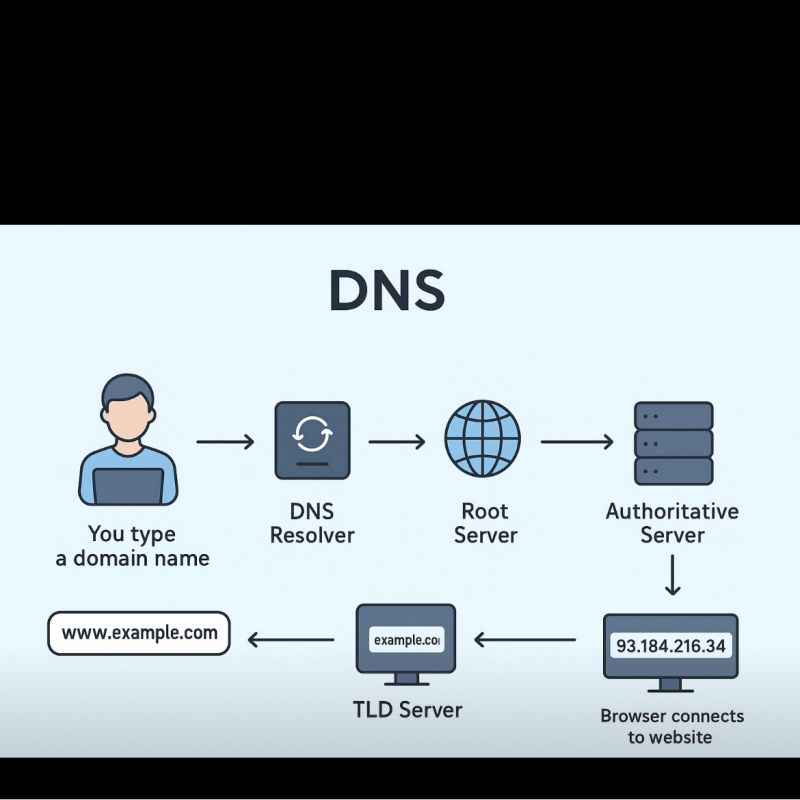
How All DNS Records Work Together for One Website
Let’s say you visit example.com.
Step 1: Who’s in charge? (NS Record)
First, DNS needs to know who manages this domain.
The NS record answers that by pointing to the authoritative DNS servers for example.com.
Real-life example:
Finding out which post office handles mail for a neighborhood.
Step 2: What’s the real address? (A / AAAA Records)
Once the correct DNS server is found, it’s asked:
“Where does this website live?”
The A record gives the IPv4 address.
The AAAA record gives the IPv6 address (if available).
Your browser now knows the exact server to contact.
Real-life example:
Getting the street address of a house.
Step 3: Are there multiple names? (CNAME Record)
If you visit www.example.com, DNS may not give an IP immediately.
Instead, a CNAME record might say:
“That’s just another name for example.com.”
DNS then follows the real name and finds the A or AAAA record.
Real-life example:
Calling a friend using their nickname saved in your contacts.
Step 4: What about email? (MX Record)
Separately, when someone emails user@example.com, DNS is asked:
“Where should this email go?”
The MX record points to the correct mail server, which may be completely different from the web server.
Real-life example:
Mail going to a building’s mailroom, not the front door.
Step 5: Is this domain trusted? (TXT Record)
Before emails are accepted or services are connected, DNS checks TXT records to verify:
Ownership
Email legitimacy
Security rules
Real-life example:
Showing ID before being allowed inside.
One Domain, Many Jobs
For a single website, DNS handles:
NS → Who manages the domain
A / AAAA → Where the website lives
CNAME → Alternate names
MX → Email delivery
TXT → Trust and verification
Each record does one simple job, but together they make websites load, emails arrive, and security work all in the background, without you noticing.
Conclusion
DNS is one of those systems you never notice when it works and immediately notice when it doesn’t. Understanding it gives you a clearer picture of how the internet actually holds itself together.


